
Menu

Asset Management in SAP S/4HANA

In S/4HANA, also known as the digital core, S/4HANA Enterprise Management is a collection of modules of which Asset Management is a part.
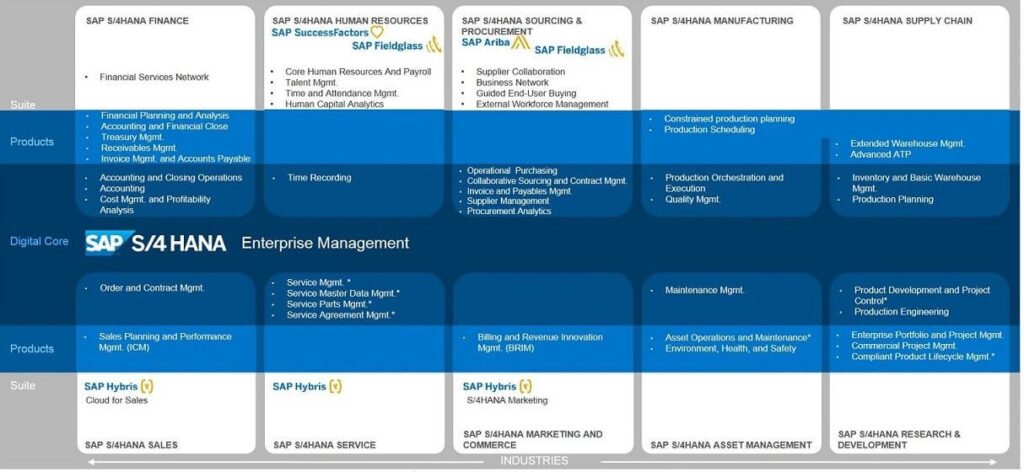
A flow chart mapping SAP S/4HANA Enterprise Management solutions by industry, detailing suites and products from finance to **asset management**. **Transcription:** SAP S/4HANA FINANCE SAP S/4HANA HUMAN RESOURCES SAP SuccessFactors ❤️ SAP Fieldglass 📶 SAP S/4HANA SOURCING & PROCUREMENT SAP Ariba ◮ SAP Fieldglass 📶 SAP S/4HANA MANUFACTURING SAP S/4HANA SUPPLY CHAIN Suite Products Digital Core SAP S/4HANA Enterprise Management Products Suite Industries **Under SAP S/4HANA FINANCE:** * Financial Services Network * Financial Planning and Analysis * Accounting and Financial Close * Treasury Mgmt. * Receivables Mgmt. * Invoice Mgmt. and Accounts Payable * Accounting and Closing Operations * Accounting * Cost Mgmt. and Profitability Analysis **Under SAP S/4HANA HUMAN RESOURCES:** * Core Human Resources And Payroll * Talent Mgmt. * Time and Attendance Mgmt. * Human Capital Analytics * Time Recording **Under SAP S/4HANA SOURCING & PROCUREMENT:** * Supplier Collaboration * Business Network * Guided End-User Buying * External Workforce Management * Operational Purchasing * Collaborative Sourcing and Contract Mgmt. * Invoice and Payables Mgmt. * Supplier Management * Procurement Analytics **Under SAP S/4HANA MANUFACTURING:** * Constrained production planning * Production Scheduling * Production Orchestration and Execution * Quality Mgmt. **Under SAP S/4HANA SUPPLY CHAIN:** * Extended Warehouse Mgmt. * Advanced ATP * Inventory and Basic Warehouse Mgmt. * Production Planning **Under SAP S/4HANA SALES:** * Order and Contract Mgmt. * Sales Planning and Performance Mgmt. (ICM) SAP Hybris ⬆️ Cloud for Sales **Under SAP S/4HANA SERVICE:** * Service Mgmt.* * Service Master Data Mgmt.* * Service Parts Mgmt.* * Service Agreement Mgmt.* SAP Hybris ⬆️ **Under SAP S/4HANA MARKETING AND COMMERCE:** * Billing and Revenue Innovation Mgmt. (BRIM) SAP Hybris ⬆️ S/4HANA Marketing **Under SAP S/4HANA ASSET MANAGEMENT:** * Maintenance Mgmt. * Asset Operations and Maintenance* * Environment, Health, and Safety **Under SAP S/4HANA RESEARCH & DEVELOPMENT:** * Product Development and Project Control* * Production Engineering * Enterprise Portfolio and Project Mgmt. * Commercial Project Mgmt. * Compliant Product Lifecycle Mgmt.* **Bottom Row - Industry Headers:** SAP S/4HANA SALES SAP S/4HANA SERVICE SAP S/4HANA MARKETING AND COMMERCE SAP S/4HANA ASSET MANAGEMENT SAP S/4HANA RESEARCH & DEVELOPMENT

SAP S/4HANA Enterprise Management

SAP S/4HANA Enterprise Management can be executed on-premise or in the cloud. SAP S/4HANA Asset Management offers similar functionality to SAP ECC Enterprise Asset Management and consists of the following components:
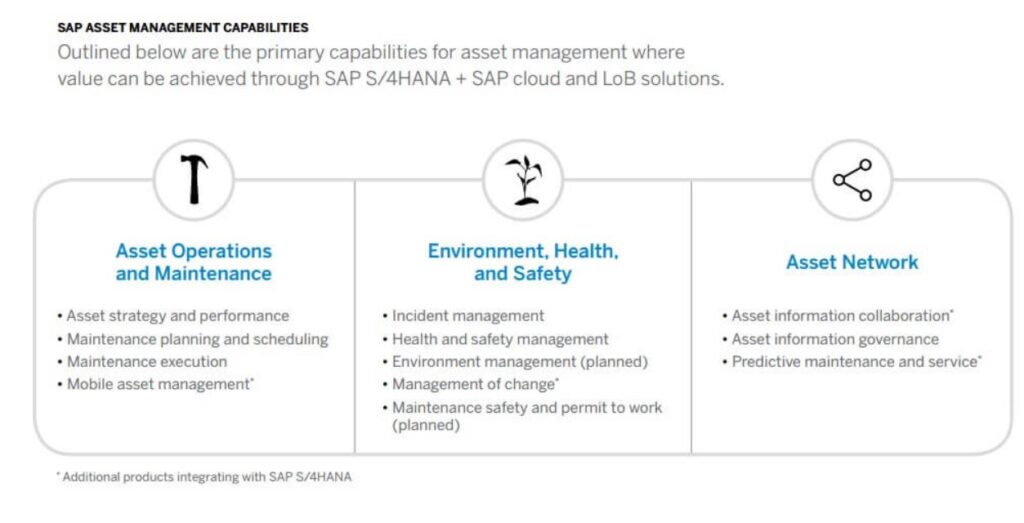
A diagram outlines `SAP ASSET MANAGEMENT CAPABILITIES`, detailing three core areas: operations, environment/health/safety, and asset network, with icons and bulleted features showcasing `SAP S/4HANA` solutions for `asset management`. **Full Text Transcription:** `SAP ASSET MANAGEMENT CAPABILITIES` Outlined below are the primary capabilities for asset management where value can be achieved through `SAP S/4HANA` + `SAP` cloud and LoB solutions. **Asset Operations and Maintenance** (hammer icon) • Asset strategy and performance • Maintenance planning and scheduling • Maintenance execution • Mobile asset management* **Environment, Health, and Safety** (plant sprout icon) • Incident management • Health and safety management • Environment management (planned) • Management of change* • Maintenance safety and permit to work (planned) **Asset Network** (share icon) • Asset information collaboration* • Asset information governance • Predictive maintenance and service* * Additional products integrating with `SAP S/4HANA`

Components of SAP S/4HANA Asset Management

S/4HANA provides you with the tools to manage and keep your asset master data up-to-date. Similar to SAP ECC, maintenance plans ensure periodic creation of maintenance orders to keep your assets in optimal condition. In addition to periodic maintenance, you can use predictive maintenance to view real-time status information and trends.

The delivered functionality will be accessible to users through the Fiori Launchpad. Additionally, traditional tools such as the Netweaver Business Client are supported, and functionality can be accessed through Webdynpros and Floorplan Manager applications.
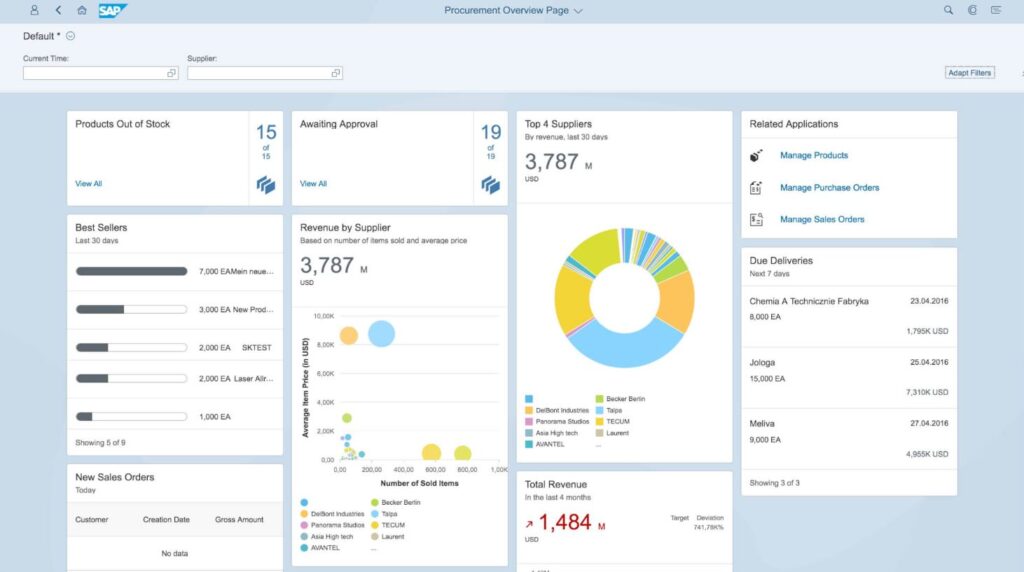
An **SAP technology** "Procurement Overview Page" dashboard visually monitors key metrics like stock levels, approvals, and supplier performance. The interface includes: "Products Out of Stock 15 of 15", "View All"; "Awaiting Approval 19 of 19", "View All"; "Best Sellers Last 30 days" (e.g., "7,000 EAMein neue...", "3,000 EA New Prod...", "2,000 EA SKTEST", "2,000 EA Laser Allr...", "1,000 EA", "Showing 5 of 9"); "Revenue by Supplier Based on number of items sold and average price 3,787 M USD" (chart with "Average Item Price (in USD)" vs. "Number of Sold Items", legend: "DelBont Industries", "Panorama Studios", "Asia High tech", "AVANTEL", "Becker Berlin", "Talpa", "TECUM", "Laurent", "..."). "Top 4 Suppliers By revenue, last 30 days 3,787 M USD" (donut chart legend: "Becker Berlin", "Talpa", "TECUM", "Laurent", "DelBont Industries", "Panorama Studios", "Asia High tech", "AVANTEL", "..."). "Related Applications" ("Manage Products", "Manage Purchase Orders", "Manage Sales Orders"). "Due Deliveries Next 7 days" ("Chemia A Technicznie Fabryka 23.04.2016 8,000 EA 1,795K USD", "Jologa 25.04.2016 15,000 EA 7,310K USD", "Meliva 27.04.2016 9,000 EA 4,955K USD", "Showing 3 of 3"). "New Sales Orders Today" ("Customer", "Creation Date", "Gross Amount", "No data"). "Total Revenue In the last 4 months ↗ 1,484 M USD" ("Target Deviation 741.78K%"). Top navigation elements: "< 8 SAP", "Procurement Overview Page ⌄", "Q Q E", "Adapt Filters", "Default * ☉", "Current Time:", "Supplier:".

SAP Procurement Overview Page

We take you through the service and maintenance process from notification to confirmation and reporting. Each topic includes a practical example supported by functionality in SAP S/4HANA:

1. Asset Management in SAP S/4HANA – The notifier

2. Asset Management in SAP S/4HANA – The work planner

3. Asset Management in SAP S/4HANA – The maintenance worker

4. Asset Management in SAP S/4HANA – The team leader

5. Asset Management in SAP S/4HANA – Management

1. The notifier

Fiori Launchpad

One of the focal points of S/4HANA is role-based work through the Fiori Launchpad. The Fiori Launchpad is positioned as the new starting point for SAP end-users. From there, the employee only sees the functionalities that are relevant to them in the form of ’tiles’.

In version 1610 of S/4HANA, Asset Management is also included. The UI is fully harmonized, so the user experiences the same ‘look and feel’ everywhere. Below is a small selection from the total set of Asset Management functionalities available in the Fiori Launchpad.
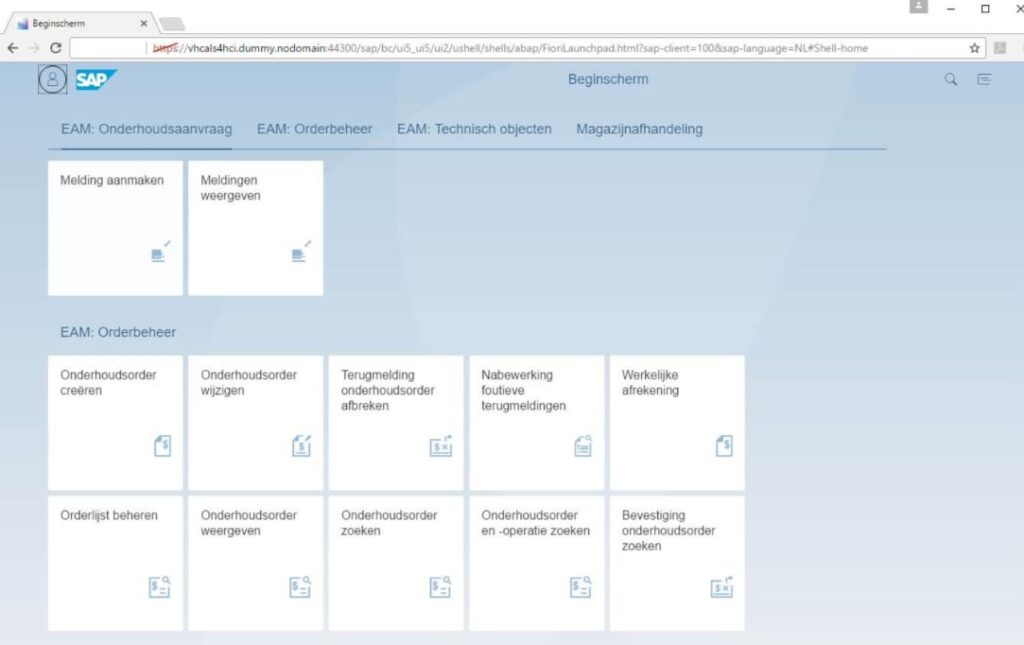
A SAP Fiori Launchpad displays various SAP technology tiles for Enterprise Asset Management (EAM) functions like 'Onderhoudsaanvraag' and 'Orderbeheer', shown in a desktop browser interface for asset management. Text: Beginscherm, `https://vhcals4hci.dummy.nodomain:44300/sap/bc/ui5_ui2/ushell/shells/abap/FioriLaunchpad.html?sap-client=100&sap-language=NL#Shell-home`, SAP, EAM: Onderhoudsaanvraag, EAM: Orderbeheer, EAM: Technisch objecten, Magazijnafhandeling, Melding aanmaken, Meldingen weergeven, EAM: Orderbeheer, Onderhoudsorder creëren, Onderhoudsorder wijzigen, Terugmelding onderhoudsorder afbreken, Nabewerking foutieve terugmeldingen, Werkelijke afrekening, Orderlijst beheren, Onderhoudsorder weergeven, Onderhoudsorder zoeken, Onderhoudsorder en -operatie zoeken, Bevestiging onderhoudsorder zoeken.

Fiori Launchpad

Request Maintenance

In your service and maintenance process, the notifier is responsible for reporting, for example, a malfunction. The notifier can easily create a maintenance request via the new app ‘Request Maintenance’.

The beauty of this app is that it can be accessed both via a laptop and a mobile device. The responsive nature of the app ensures that it adapts to the screen dimensions. The user can simply access their Fiori Launchpad for both situations.

Using quick search filters, it is possible to link a technical object to the notification. Of course, the notifier can provide details in the form of a description, long text, and location. A significant improvement is the ability to quickly add photos. The app immediately recognizes when a mobile device is used and offers the standard photo capabilities of the mobile device.
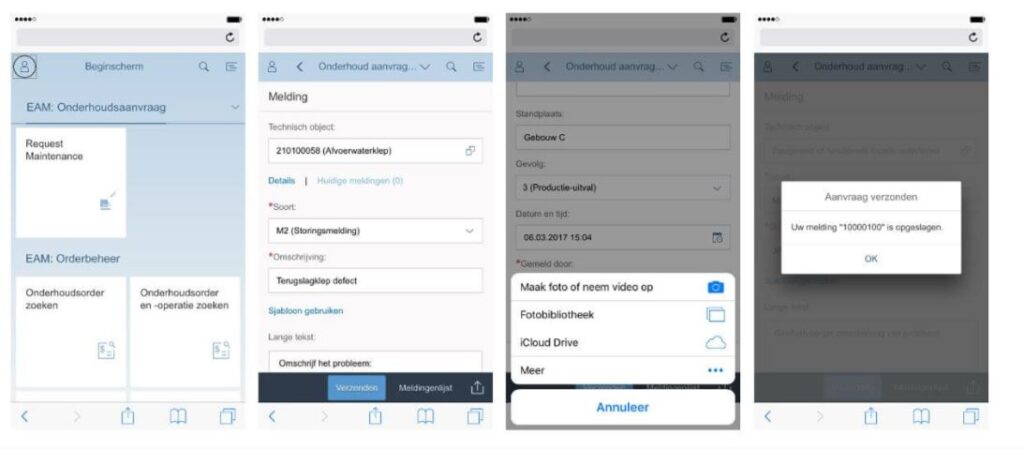
A mobile **sap fsm** interface guides a user through reporting a maintenance request for a "Terugslagklep defect" (defective check valve), culminating in an "Aanvraag verzonden" (request sent) confirmation. **Transcribed Text:** **Screen 1 (Left):** Status bar with "******" and a reload icon. Top bar has a user icon and "Beginscherm". Below, "EAM: Onderhoudsaanvraag" and "Request Maintenance". Further down, "EAM: Orderbeheer", "Onderhoudsorder zoeken", "Onderhoudsorder en -operatie zoeken". Bottom navigation bar has back arrow, forward arrow, upload icon, bookmark icon, and tabs icon. **Screen 2 (Second from left):** Status bar with "******" and a reload icon. Top bar has a user icon, back arrow, "Onderhoud aanvraag...", search icon, and menu icon. Main content: "Melding", "Technisch object: 210100058 (Afvoerwaterklep)" with a copy icon. "Details | Huidige meldingen (0)". "*Soort: M2 (Storingsmelding)" with a dropdown arrow. "*Omschrijving: Terugslagklep defect". "Sjabloon gebruiken", "Lange tekst", "Omschrijf het probleem:". Buttons: "Verzenden", "Meldingenlijst" with an upload icon. Bottom navigation bar has back arrow, forward arrow, upload icon, bookmark icon, and tabs icon. **Screen 3 (Second from right):** Status bar with "******" and a reload icon. Top bar has a user icon, back arrow, "Onderhoud aanvraag...", search icon, and menu icon. Main content: "Standplaats: Gebouw C", "Gevolg: 3 (Productie-uitval)" with a dropdown arrow. "Datum en tijd: 06.03.2017 15:04" with a calendar icon. "*Gemeld door:". Pop-up menu: "Maak foto of neem video op" with a camera icon. "Fotobibliotheek" with a photo library icon. "iCloud Drive" with a cloud icon. "Meer" with an ellipsis icon. "Annuleer" button. Bottom navigation bar has back arrow, forward arrow, upload icon, bookmark icon, and tabs icon. **Screen 4 (Right):** Status bar with "******" and a reload icon. Top bar has a user icon, back arrow, "Onderhoud aanvraag...", search icon, and menu icon. Pop-up message: "Aanvraag verzonden", "Uw melding "10000100" is opgeslagen.", "OK" button. Bottom navigation bar has back arrow, forward arrow, upload icon, bookmark icon, and tabs icon.

Request Maintenance via app

Monitor Maintenance Requests

After creating the maintenance request, the app ‘Monitor Maintenance Requests’ can be used to search and list notifications. This app offers powerful filtering and search capabilities. The capabilities in the mobile app are the same as on a laptop. So, the app provides full functionality and is not a slimmed-down version.

After listing the desired notifications, the user can customize the display and has the option to modify the notification (for example, by adding another photo).

With these two applications, the entire organization can easily assist in reporting incidents and reporting malfunctions.
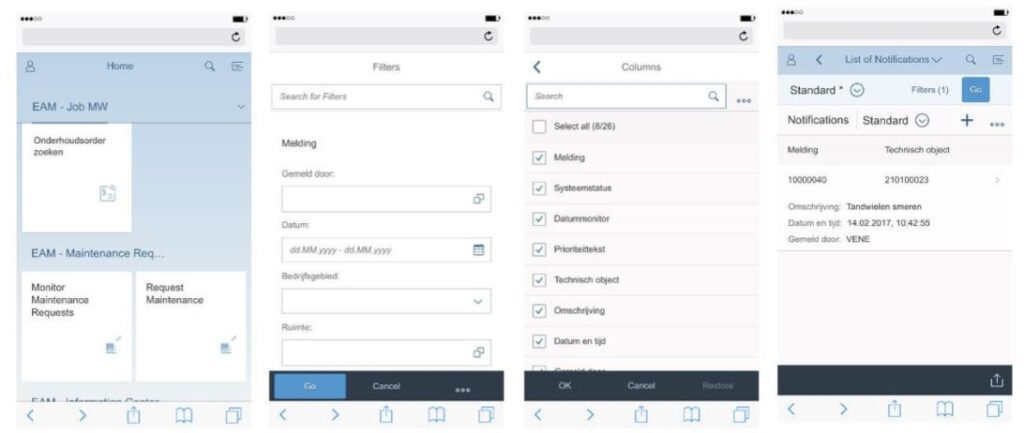
Four smartphone screens display an **SAP FSM** application, showing a home screen, filter options, column selections, and a list of notifications. Text found in the image: Home EAM - Job MW Onderhoudsorder zoeken EAM - Maintenance Req... Monitor Maintenance Requests Request Maintenance Filters Search for Filters Melding Gemeld door Datum dd.MM.yyyy - dd.MM.yyyy Bedrijfsgebied Ruimte Go Cancel ... Columns Search Select all (8/26) Melding Systeemstatus Datummonitor Prioriteitstekst Technisch object Omschrijving Datum en tijd OK Cancel Restore < List of Notifications V Standard * Filters (1) Go Notifications Standard Melding Technisch object 10000040 210100023 Omschrijving: Tandwielen smeren Datum en tijd: 14.02.2017, 10:42:55 Gemeld door: VENE

Monitor Maintenance Notifications

2. The work planner

Information Center for Orders and Notifications

As a work planner, you have an overview of all orders and notifications using the app ‘Information Center for Orders and Notifications.’ This Fiori app displays orders and notifications filtered according to your personal preferences.
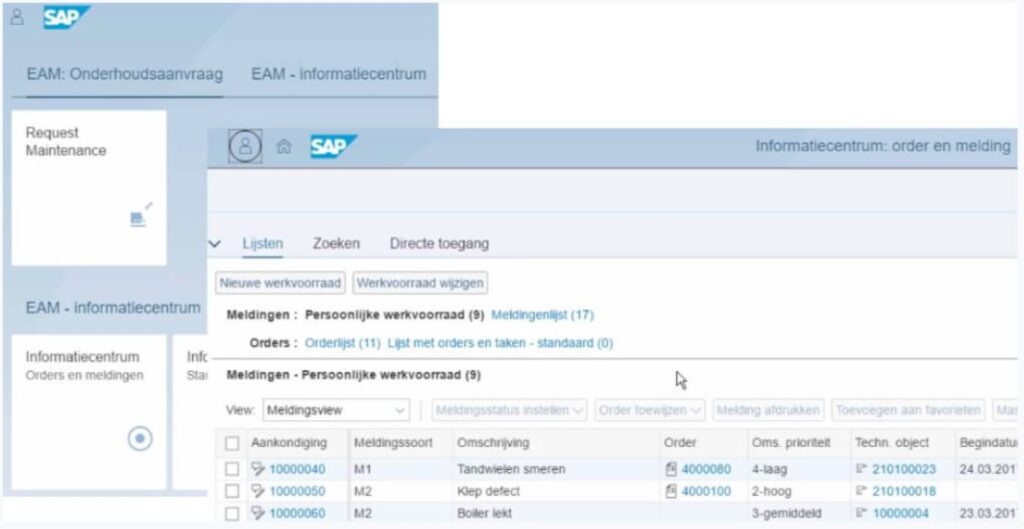
An **SAP technology** interface displays "Meldingen" (notifications) and "Orders" (work orders) for **asset management** within an EAM information center, featuring a "Request Maintenance" option. Text: "8 SAP", "EAM: Onderhoudsaanvraag", "EAM - informatiecentrum", "Request Maintenance", "Informatiecentrum: order en melding", "Lijsten", "Zoeken", "Directe toegang", "Nieuwe werkvoorraad", "Werkvoorraad wijzigen", "Meldingen : Persoonlijke werkvoorraad (9)", "Meldingenlijst (17)", "Orders : Orderlijst (11) Lijst met orders en taken - standaard (0)", "Informatiecentrum Orders en meldingen", "View: Meldingsview", "Meldingsstatus instellen", "Order toewijzen", "Melding afdrukken", "Toevoegen aan favorieten", "Aankondiging", "Meldingssoort", "Omschrijving", "Order", "Oms. prioriteit", "Techn. object", "Begindatu", "10000040", "M1", "Tandwielen smeren", "4000080", "4-laag", "210100023", "24.03.201", "10000050", "M2", "Klep defect", "4000100", "2-hoog", "210100018", "10000060", "M2", "Boiler lekt", "3-gemiddeld", "10000004", "23.03.201

Information Center for Orders and Notifications

A previously submitted fault report or maintenance request can be reviewed based on criteria such as the description and additional details provided in the notification. A decision to close the notification or create an order for it can be made directly from this screen.
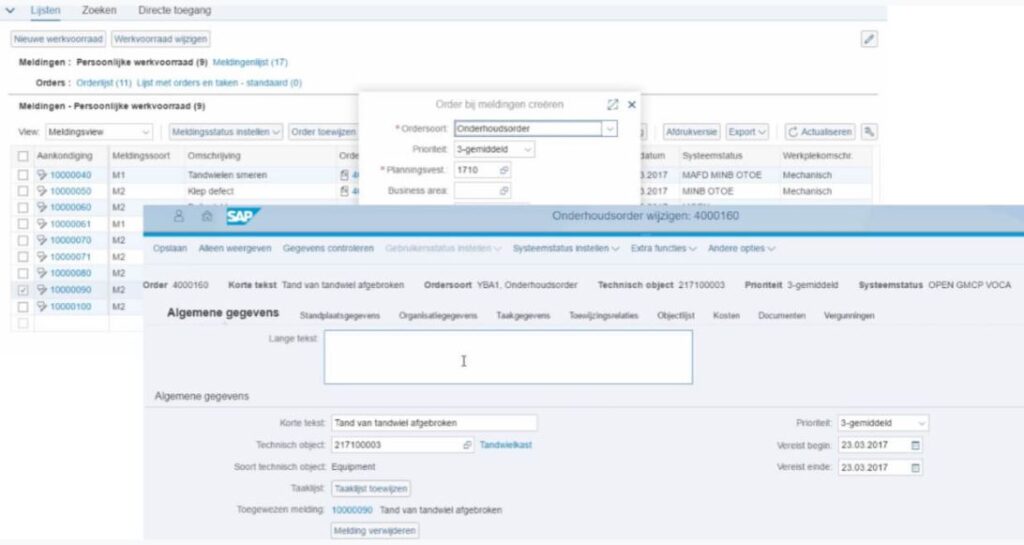
A **SAP technology** interface manages maintenance orders and notifications, featuring a pop-up window for creating a new "Onderhoudsorder" within a complex data environment. **Text found in the image:** Lijsten, Zoeken, Directe toegang, Nieuwe werkvoorraad, Werkvoorraad wijzigen, Meldingen : Persoonlijke werkvoorraad (9) Meldingenlijst (17), Orders : Orderlijst (11) Lijst met orders en taken - standaard (0), View: Meldingsview, Meldingsstatus instellen, Order toewijzen, Aankondiging, Meldingssoort, Omschrijving, Orde, 10000040 M1 Tandwielen smeren, 10000050 M2 Klep defect, 10000060 M2, 10000061 M1, 10000070 M2, 10000071 M2, 10000080 M2, 10000090 M2, 10000100 M2, Systeemstatus, Werkplekomschr., MAFD MINB OTOE Mechanisch, MINB OTOE Mechanisch, Opslaan, Alleen weergeven, Gegevens controleren, Gebruikersstatus instellen, Systeemstatus instellen, Extra functies, Andere opties, Onderhoudsorder wijzigen: 4000160, Algemene gegevens, Standplaatsgegevens, Organisatiegegevens, Taakgegevens, Toewijzingsrelaties, Objectlijst, Kosten, Documenten, Vergunningen, Lange tekst, Korte tekst: Tand van tandwiel afgebroken, Technisch object: 21710003 Tandwielkast, Soort technisch object: Equipment, Taaklijst Toewijzen, Toegewezen melding: 10000090 Tand van tandwiel afgebroken, Melding verwijderen, Prioriteit: 3-gemiddeld, Vereist begin: 23.03.2017, Vereist einde: 23.03.2017, Order bij meldingen creëren, Afleveradres Export, Actualiseren, *Ordersoort Onderhoudsorder, Prioriteit 3-gemiddeld, *Planningsvest 1710, Business area.

Create Order from Notification

General information, as well as specific task details, can be supplemented as needed. This app is also responsive and available on a smartphone, tablet, or desktop. The above screenshots show a desktop layout.

Planning in S/4HANA

SAP MRS is also available in S/4HANA, allowing created orders to be scheduled. SAP MRS for S/4HANA includes all the functionality you are accustomed to in the current ECC version. And SAP MRS for S/4HANA is actively being developed.

An SAP FSM interface displays a resource scheduling grid for managing field service assignments, with a hierarchical location tree on the left. **Text Transcription:** Assignment, Time Allocation, Alternative Working Time, Details, Delete, Find by, Name, Ideo, Duitsland, Onderhoud, Service, Verenigde Staten, Onderhoud, Service, Ideo demo, Onderhoud, Plant Eindhoven, Mechanical, Electrical and Instrument, Plant Tilburg, Service, Servicecenter Den Bosch, Servicecenter Breda, Level, Typ, Resource, [SERV-DB] Abdul Yilmaz, [SERV-DB] Angela Dekker, [SERV-DB] Burak Demir, Capac. assignments, [SERV-DB] Hans van Baalen, [SERV-DB] Harmje van der Mou..., 08:00, 10:00, 12:00, 14:00, 16:00, 4000240/10, 4000200/10, 4000200/20, 4000220/50, 4000220/30, 50000181-SERV-DB-Servicecenter Den Bosch, Planning Status, ID of Complex Demand, Position Num, Description, Opzetten maintenance documentatie, Invetten componentent 1 tm 5, Turbine controleren, Software update DXR561515, 4000200, 0010, 4000200, 0020, 4000200, 0030, 4000220

SAP MRS S/4HANA

Fiori Launchpad

One of the focal points of S/4HANA is role-based work through the Fiori Launchpad. The Fiori Launchpad is positioned as the new starting point for end-users. From there, employees only see the functionalities relevant to them in the form of ’tiles.’

In version 1610 of S/4HANA, Asset Management is also included. The UI is fully harmonized, providing users with a consistent ‘look and feel’ across all interfaces. Below is a small selection of Asset Management functionalities available in the Fiori Launchpad.
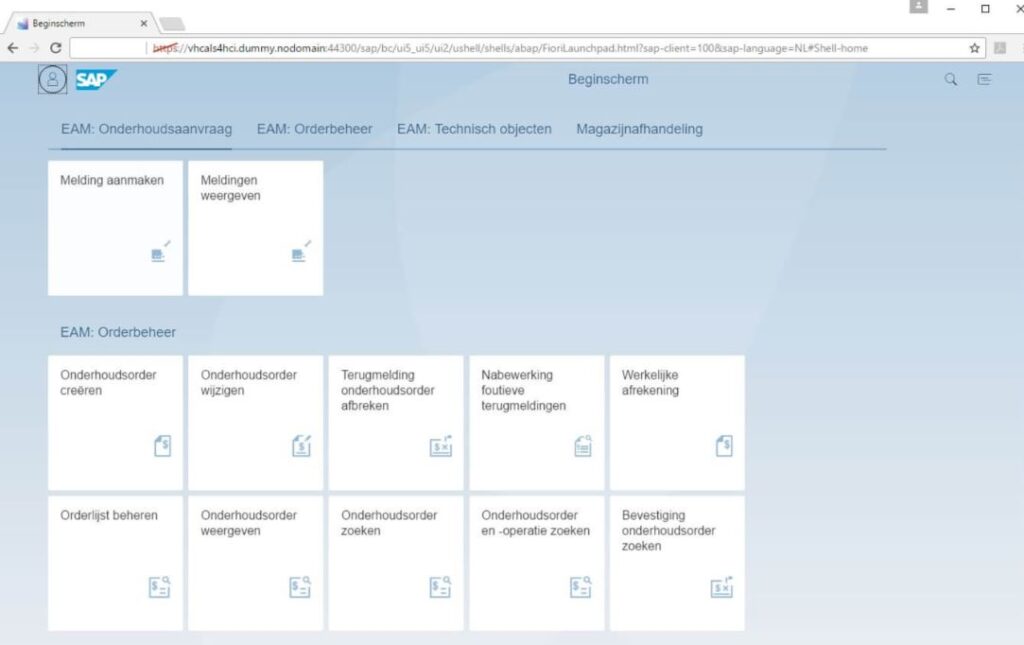
A SAP Fiori Launchpad screen, part of sap technology, displaying Dutch menu tiles for asset management functions within a web browser. Text includes: Beginscherm, https://vhcals4hci.dummy.nodomain:44300/sap/bc/ui5_ui2/ushell/shells/abap/FioriLaunchpad.html?sap-client=100&sap-language=NL#Shell-home, SAP, EAM: Onderhoudsaanvraag, EAM: Orderbeheer, EAM: Technisch objecten, Magazijnafhandeling, Melding aanmaken, Meldingen weergeven, Onderhoudsorder creëren, Onderhoudsorder wijzigen, Terugmelding onderhoudsorder afbreken, Nabewerking foutieve terugmeldingen, Werkelijke afrekening, Orderlijst beheren, Onderhoudsorder weergeven, Onderhoudsorder zoeken, Onderhoudsorder en -operatie zoeken, Bevestiging onderhoudsorder zoeken.

Fiori Launchpad

3. The maintenance worker

Fiori Launchpad

As a maintenance worker, you have access to all relevant Fiori and web applications in the Fiori Launchpad. By using these applications, the maintenance worker can easily report their worked hours and consumed materials. Below are some functionalities that make it easy for the maintenance worker to perform their tasks.

Job List

In the application below, the maintenance worker can view a list of scheduled tasks. These tasks are scheduled for you as a user. In addition to an overview, you can also easily navigate from this list to the content of the tasks to be processed. Additionally, the work order can be accessed in PDF format or the task can be assigned to a colleague.

An SAP FSM interface displays a "Takenlijst" (Job List) showing three tasks and their detailed activities below. This is an example of field service management. **Text found in the image:** SAP Takenlijst Job List - Default (3) View *[Standaardview] Werkbon weergeven Extra informatie Toewijzing bewerken Afdrukversie Export Query wijzigen Nieuwe query definiëren Personaliseren Urgentie Oms. prioriteit Omschrijving Techn. object Begindatum Begintijd Werkplekomschr. Verantw. persoon Referentiedoc. 3-gemiddeld Onderhoud Technisch object A1 210100024 29.06.2017 00:00:00 Mechanisch Casper de Groot 4000261 1-heel hoog Turbine A5 controleren 210100059 29.06.2017 00:00:00 Mechanisch Casper de Groot 4000340 4-laag Inspectieronde Centrale Services 1010 29.06.2017 00:00:00 Mechanisch Casper de Groot 4000341 Laatste actualisering 29.06.2017 12:36:18 UTC Actualiseren Details van geselecteerde taak Algemene gegevens Activiteiten Activiteit Activiteitomschr. Werk Eenheid Vroegste begindatum Vroegste begintijd Uiterste einddatum Laatste eindtijd Verantwoordelijke persoon Taak 0010 Vervangen tandwiel A6 2... 8,0 H 29.06.2017 06:00:00 29.06.2017 14:30:00 Casper de Groot Taak 0020 Repareren brandstofbev... 8,0 H 30.06.2017 06:00:00 30.06.2017 14:30:00 Casper de Groot Taak 0030 Turbine controleren 8,0 H 03.07.2017 06:00:00 03.07.2017 14:30:00 Casper de Groot Taak 0040 Oliepomp doorspoelen 8,0 H 04.07.2017 06:00:00 04.07.2017 14:30:00 Casper de Groot Taak 0050 Eindcontrole 8,0 H 05.07.2017 06:00:00 05.07.2017 14:30:00 Casper de Groot

Job List Overview

Technical Object Information

For a maintenance worker, it is important to have quick access to the information of the object on which maintenance needs to be performed. With the ‘Display Technical Object’ app, they have access to the data of the technical object on any device. For more detailed information, the ‘Asset Viewer’ (X) is helpful. In the Asset Viewer, you have access to history and related objects from the technical object. The Asset Viewer provides insight into, among other things, orders, notifications, PO releases, documents, and permits. This allows the maintenance worker to immediately know about any other tasks or notifications that are open.
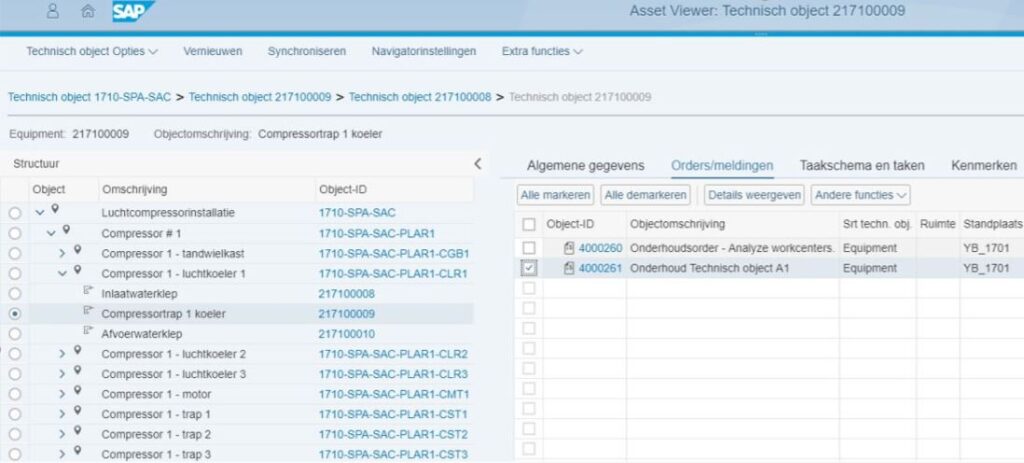
A SAP technology interface displays asset management details for a compressor component, showing its structural breakdown and associated maintenance orders on an Asset Viewer screen. **Text:** 8 SAP Asset Viewer: Technisch object 217100009 Technisch object Opties Vernieuwen Synchroniseren Navigatorinstellingen Extra functies Technisch object 1710-SPA-SAC > Technisch object 217100009 > Technisch object 217100008 > Technisch object 217100009 Equipment: 217100009 Objectomschrijving: Compressortrap 1 koeler Structuur Object Omschrijving Object-ID Luchtcompressorinstallatie 1710-SPA-SAC Compressor # 1 1710-SPA-SAC-PLAR1 Compressor 1 - tandwielkast 1710-SPA-SAC-PLAR1-CGB1 Compressor 1 - luchtkoeler 1 1710-SPA-SAC-PLAR1-CLR1 Inlaatwaterklep 217100008 Compressortrap 1 koeler 217100009 Afvoerwaterklep 217100010 Compressor 1 - luchtkoeler 2 1710-SPA-SAC-PLAR1-CLR2 Compressor 1 - luchtkoeler 3 1710-SPA-SAC-PLAR1-CLR3 Compressor 1 - motor 1710-SPA-SAC-PLAR1-CMT1 Compressor 1 - trap 1 1710-SPA-SAC-PLAR1-CST1 Compressor 1 - trap 2 1710-SPA-SAC-PLAR1-CST2 Compressor 1 - trap 3 1710-SPA-SAC-PLAR1-CST3 Algemene gegevens Orders/meldingen Taakschema en taken Kenmerken Alle markeren Alle demarkeren Details weergeven Andere functies Object-ID Objectomschrijving Srt techn. obj Ruimte Standplaats 4000260 Onderhoudsorder - Analyze workcenters. Equipment YB_1701 4000261 Onderhoud Technisch object A1 Equipment YB_1701

Asset Viewer Overview

Maintenance Order Confirmation

The “Confirm Jobs” application allows for the reporting of hours and materials. Additionally, the “My Timesheet” app can be helpful. These applications ensure that the reported hours are processed directly in SAP.

4. The team leader

Fiori Launchpad

As a team leader, it is important to have insight into the amount of work, available capacity, and hours worked by the team. We’ll show you how SAP S/4HANA supports all these aspects from the Fiori Launchpad. This launchpad provides a central place from which information is displayed quickly and beautifully.

KPI Tiles

SAP S/4HANA offers standard tools for quickly creating your own ‘KPI tile’. Such a tile displays real-time information at a glance, allowing, for example, immediate access to the number of open orders per location. In the screenshot below, you can see an example of this. When the tile is clicked, detailed information is displayed, which can be customized with smart selections and graphs.
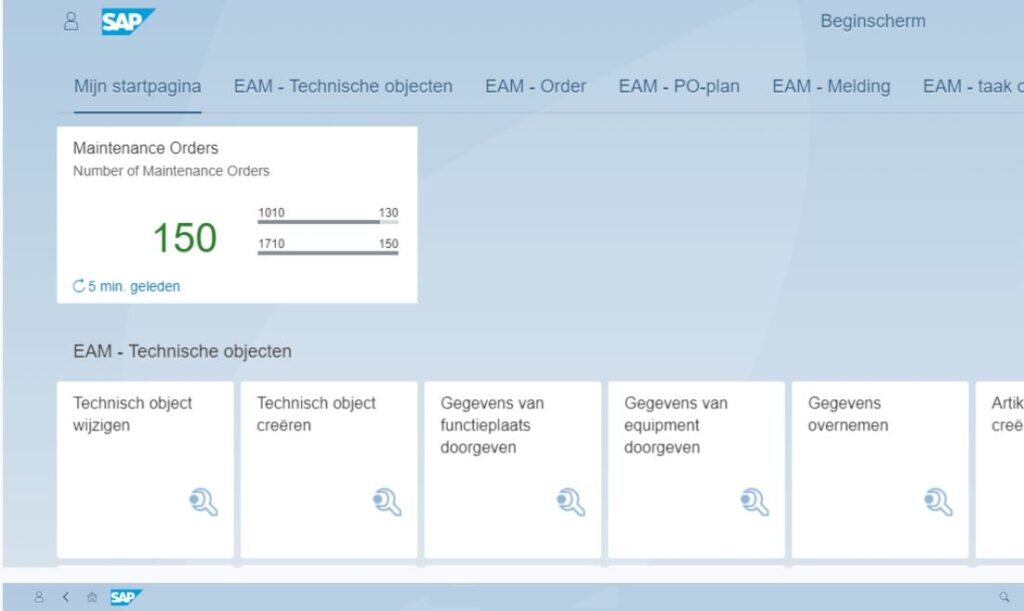
An SAP technology interface for asset management, displaying statistics and management options in a blue and white theme. Visible text includes: Top bar: '8 SAP', 'Beginscherm'. Menu: 'Mijn startpagina', 'EAM - Technische objecten', 'EAM - Order', 'EAM - PO-plan', 'EAM - Melding', 'EAM - taak o'. Main box: 'Maintenance Orders', 'Number of Maintenance Orders', '150', '1010 130', '1710 150', 'C 5 min. geleden'. Section header: 'EAM - Technische objecten'. Tiles: 'Technisch object wijzigen', 'Technisch object creëren', 'Gegevens van functieplaats doorgeven', 'Gegevens van equipment doorgeven', 'Gegevens overnemen', 'Artik creë'. Bottom bar: '8 < home icon SAP'.

KPI Tile: Real-time information at a glance
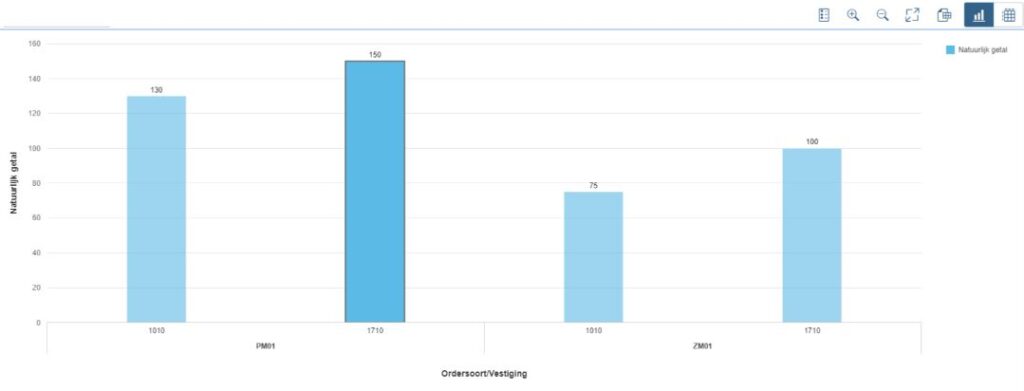
Bar chart presents numerical values for order types and locations in a digital dashboard, utilizing SAP technology. Text: Natuurlijk getal, Ordersoort/Vestiging, PM01 (1010: 130, 1710: 150), ZM01 (1010: 75, 1710: 100).

Detail Information KPI Tile

Capacity

When SAP MRS is used as a planning tool, there is a new Fiori application that provides insight into the capacity of the maintenance teams. Based on the amount of work and the availability of employees, the occupancy is displayed. This allows a team leader to quickly act in case of an imminent shortage – or surplus – of capacity.
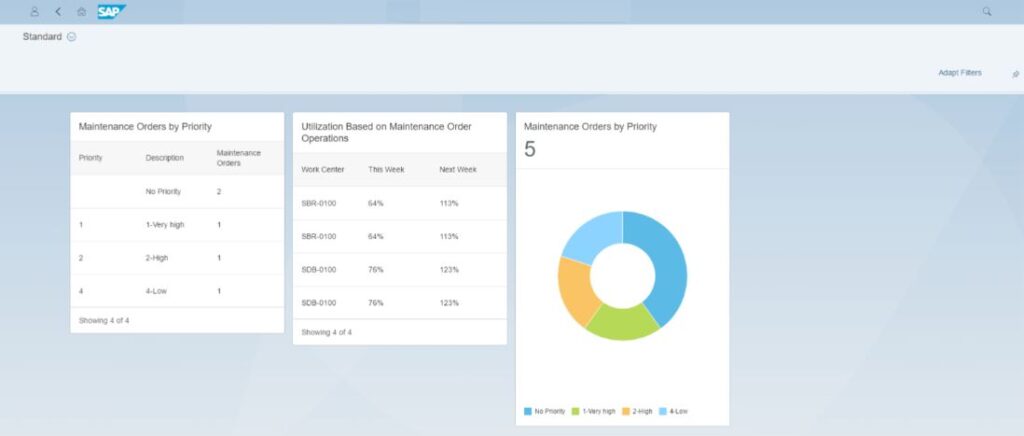
An `SAP` `field service management` dashboard presents `Maintenance Orders by Priority` via tables and a donut chart, alongside `Utilization Based on Maintenance Order Operations` data. This `Standard` interface aids `asset management`. Text: `<` `&` `<` `A` `🏠` `SAP` `Standard` `⦿` `Q` `Adapt Filters` `⭐` `Maintenance Orders by Priority` `Priority` `Description` `Maintenance Orders` `No Priority` `2` `1` `1-Very high` `1` `2` `2-High` `1` `4` `4-Low` `1` `Showing 4 of 4` `Utilization Based on Maintenance Order Operations` `Work Center` `This Week` `Next Week` `SBR-0100` `64%` `113%` `SBR-0100` `64%` `113%` `SDB-0100` `76%` `123%` `SDB-0100` `76%` `123%` `Showing 4 of 4` `Maintenance Orders by Priority` `5` `No Priority` `1-Very high` `2-High` `4-Low`

Fiori application

Time Reporting

Regarding the time reporting of the maintenance team, the ‘Approve Timesheet’ app can be helpful. This application assists the team leader in approving, correcting, and rejecting the time registration of maintenance workers. Once configured, this app is also centrally available on the Fiori Launchpad.
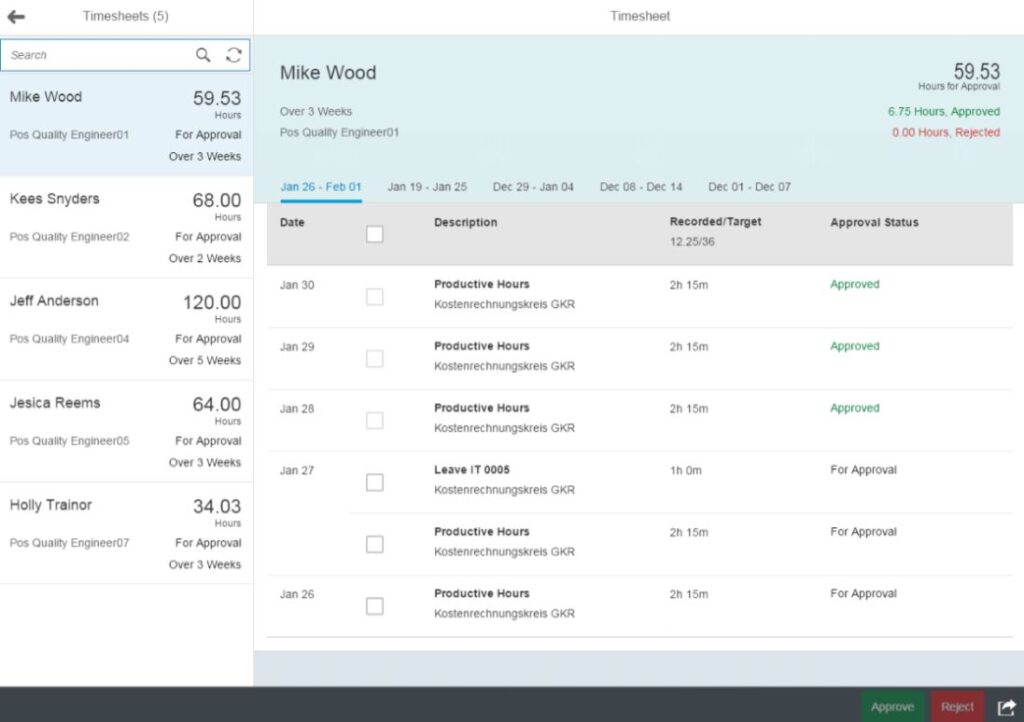
A **SAP FSM** timesheet approval dashboard displaying employee hours for review, with detailed entries for Mike Wood's weekly submissions and approval statuses. **Text found in the image:** Timesheets (5) Search Mike Wood 59.53 Hours For Approval Over 3 Weeks Pos Quality Engineer01 Kees Snyders 68.00 Hours For Approval Over 2 Weeks Pos Quality Engineer02 Jeff Anderson 120.00 Hours For Approval Over 5 Weeks Pos Quality Engineer04 Jesica Reems 64.00 Hours For Approval Over 3 Weeks Pos Quality Engineer05 Holly Trainor 34.03 Hours For Approval Over 3 Weeks Pos Quality Engineer07 Timesheet Mike Wood 59.53 Hours for Approval Over 3 Weeks Pos Quality Engineer01 6.75 Hours, Approved 0.00 Hours, Rejected Jan 26 - Feb 01 Jan 19 - Jan 25 Dec 29 - Jan 04 Dec 08 - Dec 14 Dec 01 - Dec 07 Date Description Recorded/Target 12.25/36 Approval Status Jan 30 Productive Hours Kostenrechnungskreis GKR 2h 15m Approved Jan 29 Productive Hours Kostenrechnungskreis GKR 2h 15m Approved Jan 28 Productive Hours Kostenrechnungskreis GKR 2h 15m Approved Jan 27 Leave IT 0005 Kostenrechnungskreis GKR 1h 0m For Approval Jan 26 Productive Hours Kostenrechnungskreis GKR 2h 15m For Approval Approve Reject

Fiori Launchpad – Approve Timesheet App

5. Management

Fiori Launchpad

Management needs consistent reports to aid decision-making and tools that swiftly and accurately handle routine tasks. For managers, the starting screen – the Fiori Launchpad – is equipped with ’tiles’ specifically for initiating important administrative actions. By incorporating KPI data into these tiles, it’s immediately clear which actions require attention at a glance.
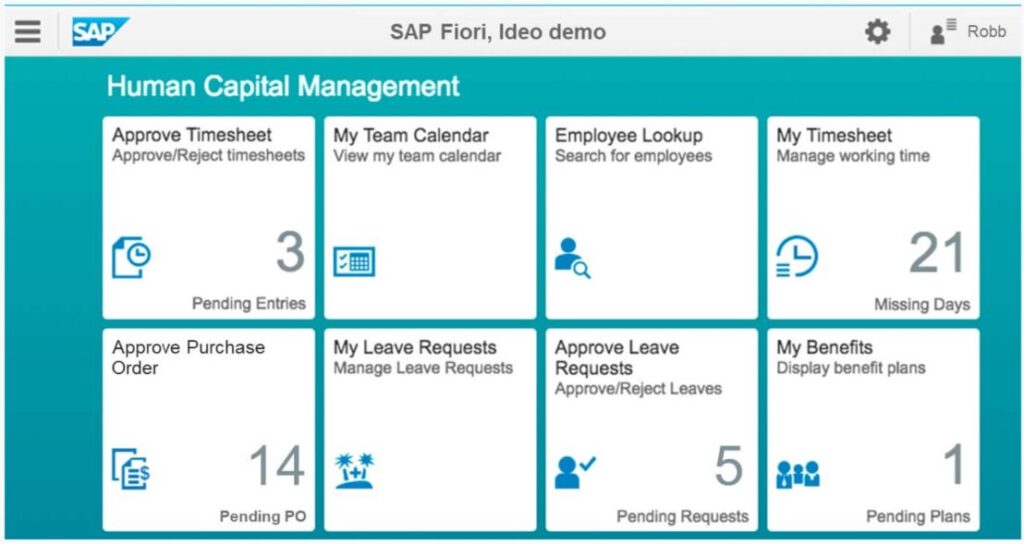
An **SAP technology** Fiori dashboard displays Human Capital Management (HCM) tasks and pending items. The interface shows six organized white tiles on a teal background. Text: SAP Fiori, Ideo demo Robb Human Capital Management Approve Timesheet Approve/Reject timesheets 3 Pending Entries My Team Calendar View my team calendar Employee Lookup Search for employees My Timesheet Manage working time 21 Missing Days Approve Purchase Order 14 Pending PO My Leave Requests Manage Leave Requests Approve Leave Requests Approve/Reject Leaves 5 Pending Requests My Benefits Display benefit plans 1 Pending Plans.

Important KPI Data

Workflow Approvals

Managers are often ultimately responsible in a workflow chain. Approving budgets, timesheets, purchase orders, and contracts are routine tasks that should be handled easily. S/4HANA facilitates this by, for example, providing apps with functionality for group processing. In the following sections, we briefly discuss some ‘approval apps’.

Approving Timesheets

Approving a timesheet is much simpler in the Approve Timesheet app. Individual timesheets can be approved, but now it can also be done for an entire team. Any deviations are quickly visible so that these exceptions can be promptly handled.

Approving Travel Expenses

Approving travel expense claims is easy via the Approve Travel Expenses app. The claims filled out by employees can be quickly viewed and processed. Moreover, it’s also possible to approve travel requests via a Fiori app. Due to the clear layout and the early notification that requests are ready for approval, processing can happen quickly. This prevents employees from waiting unnecessarily long for approval.

The total available travel budget is monitored from the ‘My Budget’ app. By selecting the cost element ‘Travel’, the budget status is displayed.

Approving Purchase Orders

Purchase orders in SAP can be limited based on a maximum amount on the purchase order. Purchase orders requiring approval are forwarded to the responsible manager. This app is also ‘responsive’. The app layout adapts to the device on which the app is used. Approving a purchase order can therefore be done from anywhere.
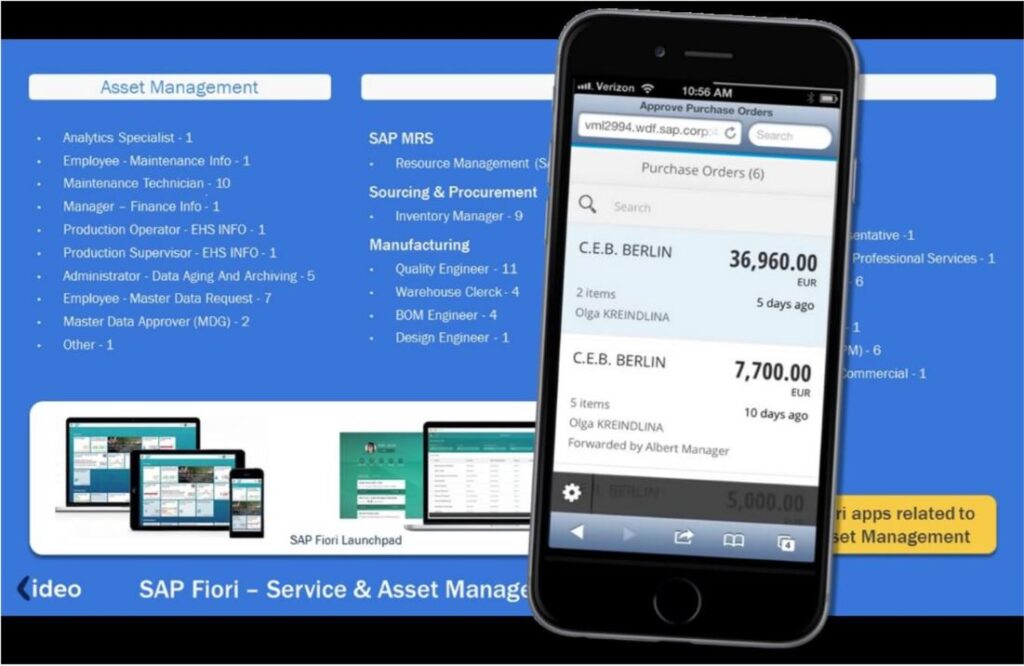
A black smartphone shows "Approve Purchase Orders" with line items, powered by **sap technology**. It's presented against a blue background highlighting "Asset Management" roles and "SAP Fiori Launchpad" on various devices. **Text found in the image:** Verizon 10:56 AM Approve Purchase Orders vml2994.wdf.sap.corp C Search Purchase Orders (6) Search C.E.B. BERLIN 36,960.00 EUR 2 items Olga KREINDLINA 5 days ago C.E.B. BERLIN 7,700.00 EUR 5 items Olga KREINDLINA Forwarded by Albert Manager 10 days ago BERLIN 5,000.00 Asset Management Analytics Specialist - 1 Employee - Maintenance Info - 1 Maintenance Technician - 10 Manager - Finance Info - 1 Production Operator - EHS INFO - 1 Production Supervisor - EHS INFO - 1 Administrator - Data Aging And Archiving - 5 Employee - Master Data Request - 7 Master Data Approver (MDG) - 2 Other - 1 SAP MRS Resource Management (S Sourcing & Procurement Inventory Manager - 9 Manufacturing Quality Engineer - 11 Warehouse Clerck - 4 BOM Engineer - 4 Design Engineer - 1 SAP Fiori Launchpad ideo SAP Fiori – Service & Asset Manage ri apps related to set Management

Approving Purchase Orders in SAP

Reports

In addition to workflow-like actions, there is also a continuous need for consistent overviews of budgets, expenses, and occupancy rates. Reports that quickly indicate where adjustments are needed. The ‘My Budget’ app was mentioned briefly. Management reports on the current expenditure status can also be displayed in S/4HANA using the Fiori app ‘My Spend’. The desired organizational groupings are graphically represented as blocks. For example, overspending is indicated with a color indication.

An **SAP technology** financial dashboard displays budget and spending data using a treemap, with a pop-up showing "Verkoopregio Zuid" expense details. SAP Fiori, Ideo demo Legal Disclosure Pri ← My Spend BestRun Core Operations-Ea Fiscal year (2017) | as of November 6, 2017 Budget Spending 1,245,200.32 EUR Spent 85,867.36 EUR (6%) left Box size represents allocated budget. < 5% below budget 5 % below or over budget General Accounting 62,269.41 EUR (15%) left Accounts Receivable Inventory Management Verkoopregio Zuid Verkoopregio Noord Marketing Campaign Design Marketing 6,972.06 EUR (2%) left Human resource 26,663.87 EUR (11%) left Payroll Administra Development an... HR Informati... Workforce... Compens... Verkoopregio Zuid (pop-up) 2,055.51 EUR (2%) over Actual EUR 134,893.51 Committed EUR 2,250.00 Budget EUR 135,088.00 View Expense Detail

My Spend Report in SAP

This display provides a quick and clear insight into the current situation. Managers can access detailed budget and expense information by selecting a block. The display can be further condensed for a desired time period, such as a quarter, a number of months, or a fiscal year.

Want to learn more about Asset Management in SAP?

Do you have questions about optimizing your asset management process in SAP? Explore all our asset management solutions, or contact our team! With over 25 years of focus on asset management in SAP, we’re here to assist you.